
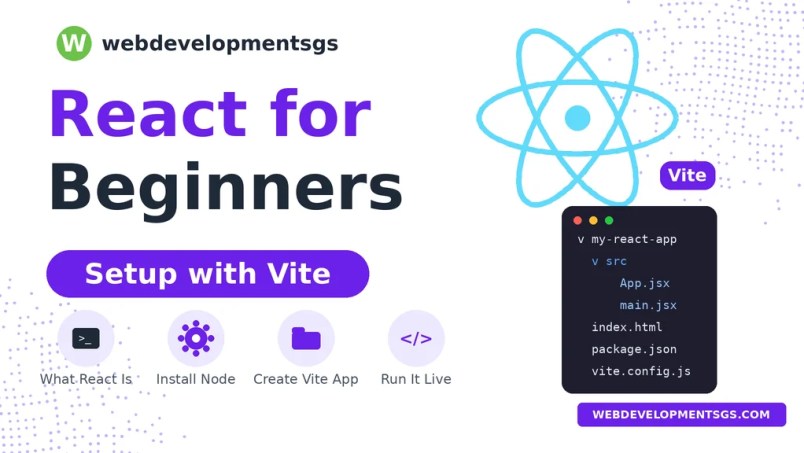
React for beginners starts with one idea: React is a JavaScript library for building user interfaces. If you already know some JavaScript, this guide explains what React is, why developers use it, and how to set up your first project with Vite in five steps.
What Is React?
React is a JavaScript library for building user interfaces. You describe what the screen should look like for a given set of data, and React updates the page when that data changes. You don’t have to manually find and edit each element in the page.
React’s main idea is the component. A component is a reusable piece of the interface, such as a button, a navigation bar, or a product card. You build a page by combining components, and each one manages its own part of the screen.
Two terms you’ll see right away:
- JSX lets you write markup-like code inside JavaScript. It looks like HTML, but it’s compiled into JavaScript before it runs.
- Props are the inputs you pass to a component, similar to function arguments. We’ll cover them in a later post.
Why Use React?
Plain JavaScript can update the page directly, but as an app grows, keeping track of what changed becomes hard. React reduces that work. You describe the result you want, and React handles the updates. This approach keeps code easier to read and reuse, especially in larger projects.
React is also used widely, which means you’ll find many tutorials, libraries, and job postings that rely on it. For a beginner, that community size is a real advantage.
This React for beginners guide assumes you know basic JavaScript, so you can focus on the new ideas.
What You Need Before Starting React for Beginners
You’ll need:
- Basic JavaScript, including variables, functions, and arrays. If you’re not comfortable with these yet, read our JavaScript arrays guide first.
- Node.js installed on your computer. Vite requires a recent version. Check Vite’s current documentation for the minimum version, then download the latest LTS release from nodejs.org.
- A code editor. Visual Studio Code is a common choice.
- A terminal. This is the Command Prompt or PowerShell on Windows, or Terminal on macOS and Linux.
To check Node.js, run:
node -v
npm -v
If both commands print version numbers, you’re ready.
Why Vite?
Vite is a build tool and development server. It starts your project quickly, refreshes the browser as you save changes, and prepares your code for production. Older React setups used Create React App, which is no longer recommended for new projects. Vite is the simpler option today.
Step 1: Create Your Project
Open your terminal in the folder where you keep your projects, then run:
npm create vite@latest my-react-app -- --template reactThis command creates a folder called my-react-app with a basic React project. The --template react flag tells Vite to use React instead of plain JavaScript or another framework.
If Vite asks you questions during setup, accept the defaults for now.
Step 2: Install the Dependencies
Move into the new folder and install the packages the project needs:
cd my-react-app
npm install
This downloads the libraries listed in package.json into a node_modules folder. You only need to run this once, or again after you add a new package.
Step 3: Start the Development Server
Run:
npm run devThe terminal will show a local address, usually http://localhost:5173. Open it in your browser. You should see the default Vite and React starter page. Leave the terminal running while you work. Any changes you save will appear in the browser automatically.
To stop the server, press Ctrl + C in the terminal.
Step 4: Understand the Project Structure
Open the project in your editor. The most important files are:
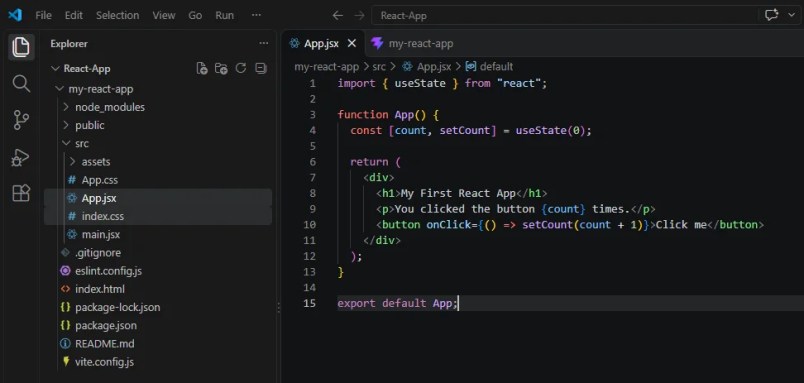
index.html: the single HTML page that loads your app. React draws everything inside a<div id="root">element here.src/main.jsx: the entry point. It connects your main component to the page.src/App.jsx: the main component where you’ll spend most of your time at first.src/index.cssandsrc/App.css: styles for the starter page. You can delete or replace them as you go.package.json: the project’s name, scripts, and dependencies.vite.config.js: Vite’s configuration. You won’t need to change it for beginner projects.
Step 5: Edit Your First Component
Open src/App.jsx and replace its contents with this:
import { useState } from "react";

function App() {
  const [count, setCount] = useState(0);

  return (
    <div>
      <h1>My First React App</h1>
      <p>You clicked the button {count} times.</p>
      <button onClick={() => setCount(count + 1)}>Click me</button>
    </div>
  );
}

export default App;
Save the file and check your browser. The page updates without a manual refresh. Click the button, and the number increases.

Here’s what’s happening:
Appis a component, which is just a JavaScript function that returns JSX.useState(0)creates a value,count, that starts at 0. React will re-render the component when it changes.setCountis the function that updatescount.onClickruns the code you give it when the button is clicked.
We’ll cover useState in detail in a later post. For now, the goal is to see the pieces working together.
Common Problems and Fixes
npmis not recognized: Node.js isn’t installed correctly, or your terminal needs to be restarted after installation.- The page is blank: Check the terminal for error messages, then check the browser’s developer console (press
F12). - Port 5173 is already in use: Another server is running. Close it, or let Vite choose another port when it asks.
- Changes don’t appear: Make sure you saved the file, and that the terminal running
npm run devhasn’t stopped.
What to Learn Next After This React for Beginners Guide
These are good next steps for anyone following this React for beginners guide:
- Learn how components pass data with props.
- Learn how
useStatemanages changing values. - Learn how
useEffecthandles side effects such as fetching data. - Build a small project, such as a to-do list, to practice everything together.
The official React documentation at react.dev is the most reliable reference, and it includes an interactive tutorial. We’ll publish follow-up posts on each topic above.
Frequently Asked Questions
Is React for beginners hard to learn?
Not if you know JavaScript basics. The core ideas, components and state, take a few days to understand. Mastering them in real projects takes longer.
Should I learn React or Angular first?
React is smaller and more flexible, which makes it a good first framework for many beginners. Angular includes more built-in tools and is common in large enterprise teams. Either is a reasonable choice, and the concepts transfer.
Do I need Vite to use React?
No. You can use React without Vite, but Vite is the simplest modern setup for learning and for new projects.
What’s the difference between React and a framework like Next.js?
React is a library for building interfaces. Next.js is a framework built on React that adds routing, server rendering, and other features. Learn React first, then consider Next.js for larger projects.
Found this helpful? Explore more of our JavaScript tutorials, and check back for the next post in the React series.
